For years, conversion tracking was simple: drop a pixel on the thank-you page and let it fire in the shopper's browser. That model is breaking. Browsers, privacy features and ad blockers now stop a large share of those pixels from ever reporting, so your ad platforms see fewer conversions than actually happened and optimize against an incomplete picture. Server-side tracking is the fix, and it has gone from a nice-to-have to the difference between data you can bid on and data you cannot.
What is server-side conversion tracking?
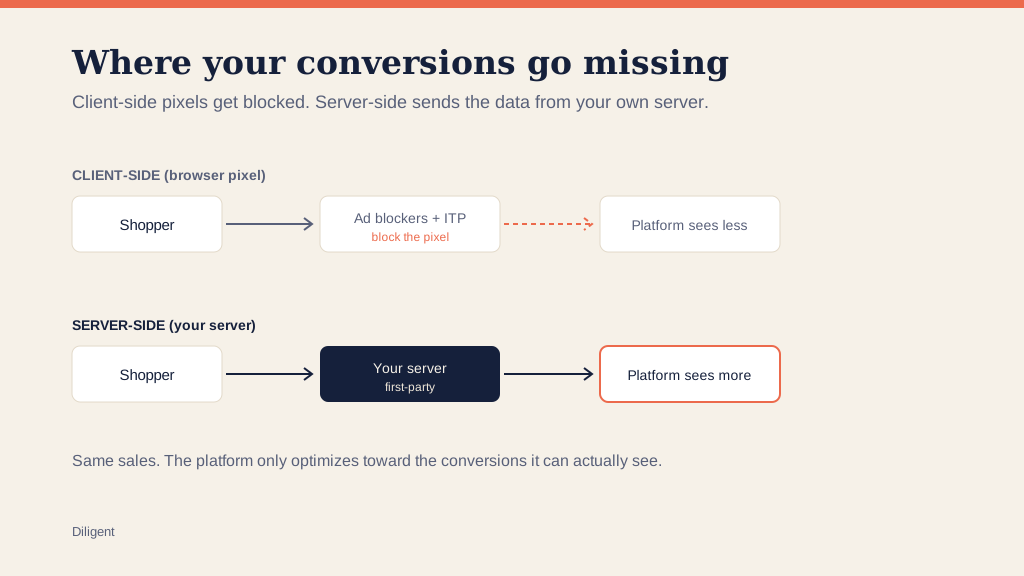
Client-side tracking fires from the shopper's browser straight to the ad platform. Server-side tracking routes the event through your own server first, then sends it on to Google, Meta and the rest as first-party data. Same conversion, different messenger. Because the event now comes from your server rather than a browser script a blocker can kill, far more of your real conversions actually arrive. In practice it usually means a server-side Google Tag Manager container plus the platform APIs built for this: Google's Enhanced Conversions and Meta's Conversions API.
How server-side tracking actually works
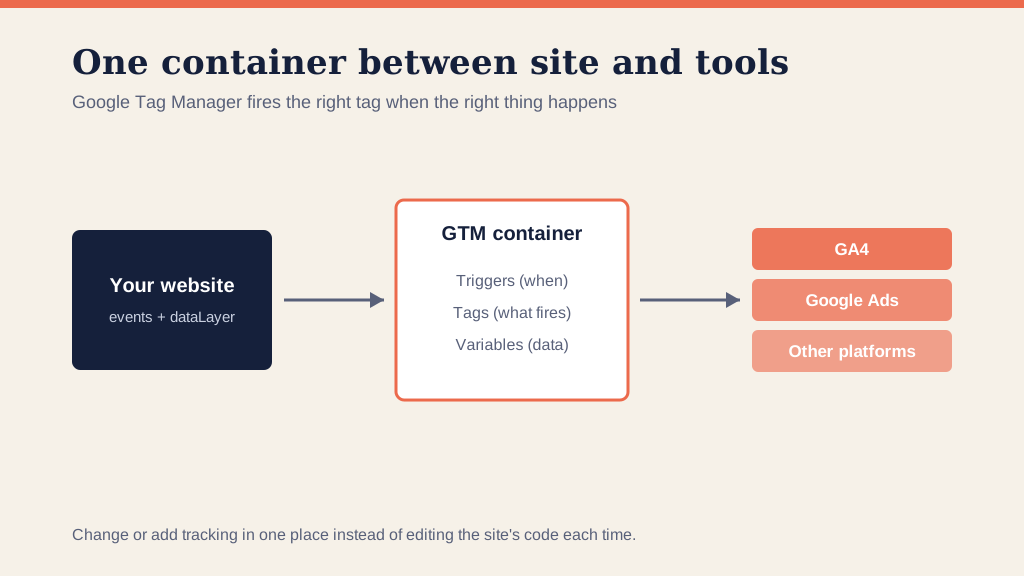
The shape of it is simpler than the jargon suggests. Instead of the shopper's browser talking directly to a dozen ad platforms, the browser sends the event to a server-side Google Tag Manager container running on your own domain. That container then forwards the conversion to each platform as a first-party, server-to-server call. Three things change as a result. The data leaves from your infrastructure rather than a third-party script, so ad blockers and tracking-prevention features have nothing to intercept. You control what is collected and sent, which is better for both accuracy and privacy. And the platforms receive a cleaner, more complete signal to learn from.
On top of that container sit the platform-specific tools. Google's Enhanced Conversions hashes first-party data like an email address, with consent, and uses it to recover conversions that the cookie alone would have missed. Meta's Conversions API does the equivalent for Meta. They are not separate strategies competing with the server-side container; they are how the container hands each platform the strongest possible match. Together they close most of the gap that browser-only tracking opens.
Why client-side tracking is leaking
Two forces are draining browser-based tracking. The first is privacy tech: Apple's App Tracking Transparency and Safari's Intelligent Tracking Prevention limit or strip the cookies and scripts that pixels rely on. The second is ad blockers, which run on a large share of desktop users and silently block tracking scripts before they fire. Add them up and the loss is not a rounding error. Industry estimates commonly put the share of conversions missing from pixel-only setups in the double digits, often 20% or more, and higher on iPhone traffic where Apple's privacy controls bite hardest. The platform never knows those sales happened, so it cannot learn from them. A fifth of your conversions invisible to the bidding is a fifth of your best customers the algorithm cannot go and find more of.
The same shift, across every platform
This is not a Google-only or Meta-only problem, and the fix is not platform-specific either. The leak comes from the browser, so it affects every ad platform that relies on a client-side pixel, and the remedy is the same everywhere: send the conversion from your server as first-party data. Google calls its version Enhanced Conversions, Meta calls its the Conversions API, and the other major platforms have built their own server-side event endpoints because they all face the same erosion. A server-side Google Tag Manager container can fan a single, clean conversion event out to all of them at once.
That is the strategic point hiding inside a technical one. Once you stand up the server-side layer, you are not bolting a patch onto one platform; you are rebuilding the foundation every platform reads from, so each one optimizes on a fuller, more consistent picture of the same sales. The brands that treat this as a one-platform fix keep re-solving it channel by channel. The ones that treat it as infrastructure solve it once.
What server-side tracking recovers
Sending events server-side closes most of that gap. First-party data passed through Enhanced Conversions or the Conversions API matches users at far higher rates than a raw pixel, and the recovered volume is real money. Meta reports an average of around 19% more attributed conversions for advertisers using its Conversions API, and ecommerce stores moving to server-side commonly recover a meaningful slice of the conversions they were losing. The point is not a bigger number on a dashboard for its own sake. It is that the bidding algorithms finally see closer to the full set of sales and can optimize toward them.
What recovered conversions do beyond the dashboard
The recovered volume is not just a prettier number; it changes what the bidding can do. Every conversion that now reaches the platform is a real customer the algorithm can study and go find more of, so closing the gap sharpens targeting, not just reporting. The effect is largest where data is thinnest. On a brand-new account with no purchase history, the events you manage to capture are the only thing Smart Bidding has to learn from, which is why we build a full event layer, macro and micro, before a campaign spends, the approach behind our measurement rebuild work.
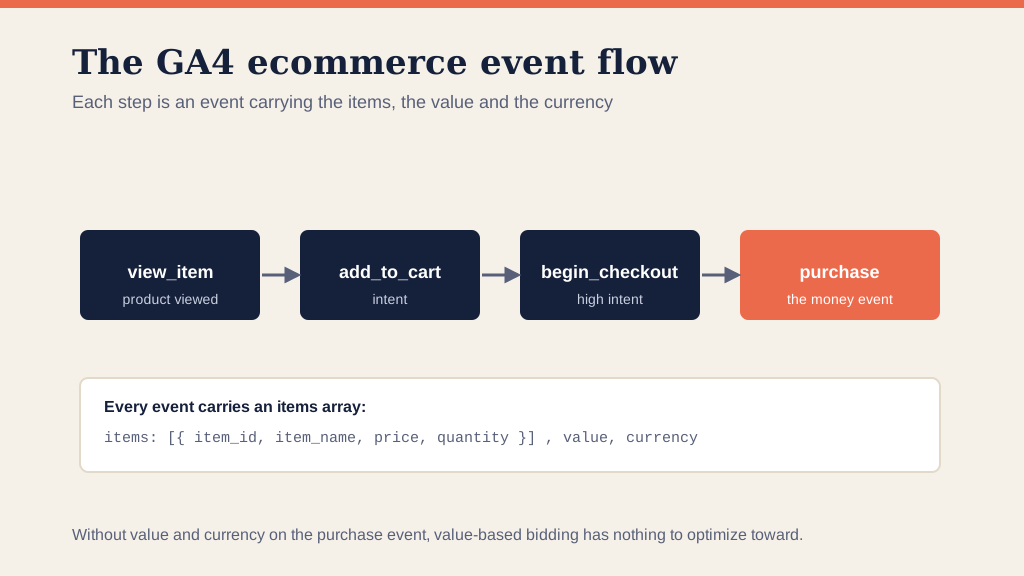
The micro events earn their keep twice over. Add-to-cart, begin-checkout and key-page views are not sales, but together they tell the algorithm who is behaving like a buyer long before the purchase, and they let you segment audiences precisely. Someone who viewed three products and started a checkout is a different audience, worth a different bid and message, than a bounce. Those event-based audiences feed remarketing and the audience signals that accelerate Performance Max, so a clean server-side setup pays off across the whole account, not only in the conversion column.
Consent mode and the conversions you never see
Privacy rules add a second layer to the problem, and ignoring it is how reported conversions drift below reality without anyone noticing. In regions with consent requirements, a share of visitors decline cookies, and a naive setup simply loses those conversions. Google's Consent Mode is built for this: when a user does not consent, the platform stops setting cookies but can still model the missing conversions from aggregate patterns, so the bidding is not blind to a whole segment of buyers. Configured properly, consent mode and server-side tracking work together, one handling the legal posture and the other the technical delivery. Configured carelessly, a consent banner becomes one of the biggest reasons a brand's numbers are wrong.
Server-side is not a magic switch
It has to be built correctly, and this is where most setups go wrong. Server-side tracking can just as easily double-count, pass the wrong values, or report conversions that did not really happen, and a confidently wrong number is more dangerous than an honestly incomplete one. The values have to be right, the events deduplicated against the client-side ones so a single sale is not counted twice, and everything reconciled to your actual backend. That last step is the one teams skip and the one that matters most: a tag that fires is not a tag that reports correctly, so we compare what the platforms report against the store's real orders until they agree. That reconciliation is the core of how we rebuild conversion tracking and stand up web analytics you can trust, on top of a clean GA4 setup. On one account we took over, the gap between reported and real conversions was roughly 50%, the case behind our measurement rebuild playbook, and a gap that size misdirects the whole budget, not just the report.
What building it properly looks like
Server-side tracking done right is a sequence, and skipping a step is how the confidently-wrong numbers get in. The order we work in is the same every time.
First, measure the gap before you change anything: reconcile what Google Ads and GA4 report against the store's real orders over the same window, so you know how much you are actually losing and have a baseline to prove the fix against. Second, stand up the server-side container on your own subdomain, so the data leaves from your infrastructure rather than a third-party script. Third, move the key conversions through it and wire up Enhanced Conversions and the Conversions API, passing hashed first-party data with consent so the platforms can match what the cookie alone would miss. Fourth, deduplicate: every server event carries an ID that matches its client-side twin, so a single sale is counted once, not twice. Fifth, configure consent mode so declined-cookie traffic is modeled rather than silently dropped. Sixth, reconcile again, against the backend, until the platform numbers and reality agree within a small margin. Only then is the data safe to bid on.
None of these steps is exotic, but the value is in doing all of them, in order. A setup that recovers volume without deduplicating, or that sends events without reconciling to the backend, can leave you worse off than the leaky pixel it replaced, because now the wrong number looks authoritative.
It is never set and forget
The most dangerous thing about measurement is that it breaks without a warning light. Sites get redeployed, tag managers get edited, a developer ships a change that breaks a trigger, and a checkout migration orphans the conversion from the click that drove it. None of it throws an error; the number just drifts, and a value strategy running on drifted data fails silently. So reconciliation is a standing check, not a launch task. We compare platform conversions against the backend on a cadence, because the only thing worse than no tracking is tracking everyone trusts that has gone wrong.
How this connects to your bidding
Tracking is not an analytics side-quest. It is the input to every automated decision your account makes. If the platform is missing a fifth of your conversions, your reported ROAS is wrong, your Target ROAS is set against a lie, and Smart Bidding optimizes toward whatever it can still see, which skews the account. This is why we fix measurement before we touch bidding, and it is the same thread running through what a good ROAS really means and MER versus ROAS: a number is only as honest as the tracking under it. Get the measurement right and value-based bidding, prospecting targets and Performance Max exclusions all inherit a signal they can trust; get it wrong and every one of them optimizes harder toward the wrong outcome.
Frequently asked questions
Do I need server-side tracking, or are Enhanced Conversions enough? They work best together. Enhanced Conversions and the Conversions API recover matches using first-party data, and a server-side container is the cleanest way to deliver that data while sidestepping ad blockers and tracking prevention. For an ecommerce store losing a meaningful share of conversions, the combination is worth building properly.
Will server-side tracking inflate my conversions? Only if it is built badly. The risk is double-counting against the existing client-side tags, which is why events must be deduplicated and the totals reconciled to your backend orders. Done right, you recover real conversions without counting any sale twice.
Is server-side tracking compliant with privacy rules? It can be, and configured with consent mode it is often more privacy-respecting than client-side, because you control exactly what is collected and sent. Compliance depends on honoring consent and handling first-party data correctly, not on the technique itself.
How much of my missing data will it recover? It varies by traffic mix, but pixel-only setups commonly miss 20% or more of conversions, and more on iPhone, and server-side recovers most of that gap. The honest answer for any specific store comes from reconciling the platforms against the backend first.
Which conversions should I send server-side? Start with the money events, the purchase or qualified lead with an accurate value, because those drive the bidding. Then add the micro events, add-to-cart and begin-checkout, that let the algorithm learn quality early and let you build precise remarketing audiences. The purchase is the priority; the micro layer is the accelerant.
Will server-side tracking slow down my site? No, and it can help. Because the heavy lifting moves off the shopper's browser and onto your server, server-side setups often reduce the number of third-party scripts loading on the page, which is better for page speed, not worse.
The short version
- Client-side pixels are blocked by privacy features and ad blockers, so pixel-only tracking commonly misses 20% or more of conversions, and more on iPhone.
- Server-side tracking sends events from your own server as first-party data, recovering most of that gap. Meta alone reports around 19% more attribution through its Conversions API.
- It only helps if it is built right: correct values, deduplicated events, consent handled, reconciled to your backend.
- Clean tracking is the input to good bidding. Fix it first, then scale.