Most ecommerce GA4 setups track that a sale happened but not what it was worth, or they fire a purchase event with no items and no value. That gap breaks everything downstream, because your bidding, your reporting and your product analysis all depend on the purchase event being complete. This guide walks the GA4 ecommerce event flow, the items array, and the fields that decide whether your data can actually drive bidding.
The short version
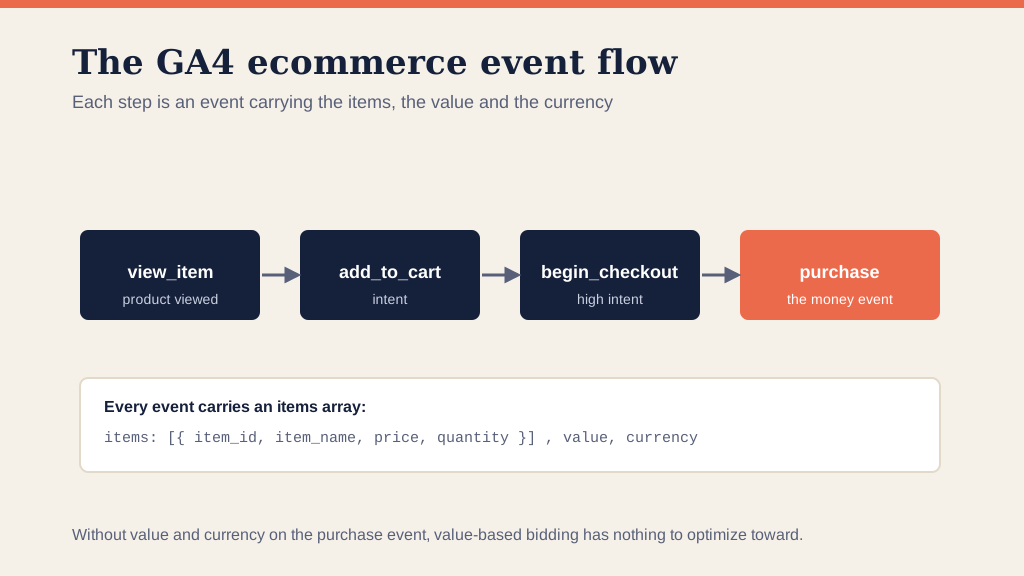
- GA4 ecommerce tracking is a set of events (view_item, add_to_cart, begin_checkout, purchase) that follow a shopper through the funnel.
- Every event carries an items array describing the products, and the purchase event carries a value and currency.
- The value and currency on the purchase event are what value-based bidding optimizes toward; without them, bidding falls back to counting conversions.
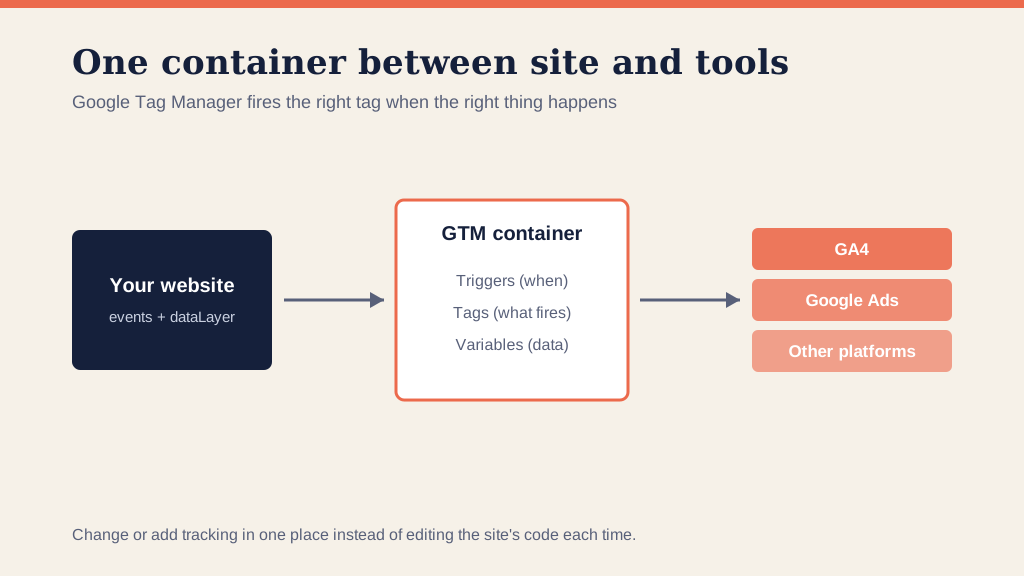
- You implement it with a dataLayer push on each step, read into GA4 through Google Tag Manager.
- Verify a test purchase in DebugView, then reconcile totals against your backend before you trust it.
What is GA4 ecommerce tracking?
GA4 ecommerce tracking is the set of recommended events that record how a shopper moves through your store, from viewing a product to buying it. Where basic tracking might log a single conversion, ecommerce tracking captures the whole path with product detail attached, so you can see not just that a sale happened but what was in it and where other shoppers dropped off.
It is built on GA4's event model. Each ecommerce action is an event with a name Google recognises, carrying a structured items array. Get the structure right and GA4, Google Ads and your reporting all read the same clean data.
The core ecommerce events
The funnel is four events, with a few supporting ones:
- view_item. A shopper views a product page.
- add_to_cart. They add it to the cart, the first real intent signal.
- begin_checkout. They start checkout, high intent.
- purchase. The sale completes. This is the money event.
Around these sit view_item_list, select_item, view_cart and add_shipping_info, which fill in the funnel. Tracking the full set is what lets you see where the funnel leaks, the analysis behind our funnel-leak playbook.
What is the items array?
Every ecommerce event carries an items array, the list of products involved. Each item has fields like item_id, item_name, price and quantity, plus optional ones like item_category and item_brand. This is what makes product-level reporting possible and what carries accurate value into the purchase event.
Consistent item_ids across the funnel matter more than people expect. If the id a shopper viewed does not match the id they bought, GA4 cannot connect the journey, and your product reports fracture.
Why value and currency decide what bidding can do
Here is the part that turns a tracking detail into a money problem. Smart Bidding and Target ROAS optimize toward revenue, and they can only do that if each purchase reports its real value and currency. A purchase event that fires without a value gives the algorithm nothing to weigh, so it falls back to treating every sale as equal, and value-based bidding stops being value-based.
This is why we treat the purchase event's value and currency as non-negotiable. It is the bridge between your analytics and your value-based bidding, and it is where a lot of otherwise-fine setups fall down.
How to set up GA4 ecommerce tracking
The implementation follows a clear path:
- Push each event to the dataLayer. Have the site fire view_item, add_to_cart, begin_checkout and purchase with the items array, value and currency at the right moments. On Shopify or a custom build this is a developer task.
- Read it into GA4 through GTM. Use Google Tag Manager to map the dataLayer into GA4 event tags, rather than hardcoding each one.
- Mark purchase as a key event. So it counts as a conversion and can be imported into Google Ads.
- Send the value to Google Ads too. So bidding optimizes on the same revenue GA4 sees.
For the wider event mechanics beyond ecommerce, our guide to tracking events in GA4 with GTM goes deeper.
How to verify it
Trigger a test purchase and watch it in GTM Preview mode and GA4 DebugView. Confirm the purchase event arrives with a populated items array, a value and a currency, not just that it fired. Then reconcile GA4's revenue against your backend orders, because a purchase event that double-fires or misses a value will distort every number built on top of it.
Frequently asked questions
What is the purchase event in GA4? The purchase event is the GA4 ecommerce event that records a completed sale. It carries an items array describing what was bought plus a value and currency, and it is the event Google Ads and Smart Bidding lean on to know what a conversion is actually worth.
What are the main GA4 ecommerce events? The core funnel is view_item, add_to_cart, begin_checkout and purchase, with view_item_list, select_item and add_shipping_info filling it out. Each carries the items array, so you can see where shoppers drop off between viewing, carting, checking out and buying.
What is the items array in GA4? The items array is the list of products attached to an ecommerce event, with fields like item_id, item_name, price and quantity. It is what lets GA4 report product-level performance and what feeds accurate value into the purchase event.
Why is value and currency important on the purchase event? Because value-based bidding optimizes toward revenue, and it can only do that if each purchase reports its real value and currency. A purchase event firing without a value gives Smart Bidding nothing to weigh, so it falls back to counting conversions rather than chasing revenue.
How do I check GA4 ecommerce tracking is working? Use GTM Preview mode and GA4 DebugView. Trigger a test purchase and confirm the purchase event arrives with a populated items array, a value and a currency. Then reconcile the totals against your backend orders before you trust the numbers.
Ecommerce tracking is the foundation your bidding and your reporting both stand on, and a complete purchase event is what makes the rest trustworthy. If you would rather have it built and reconciled for you, that is what our conversion tracking service is for.