
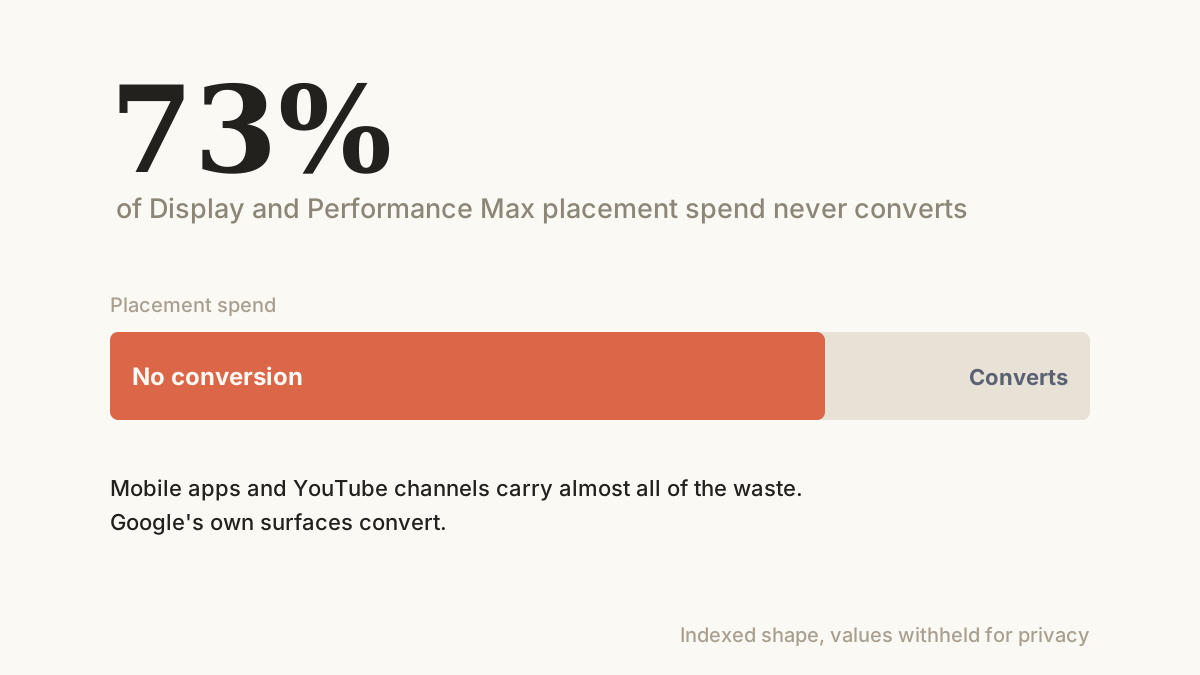
The networks decide where your ads run. The report is the receipt.
Display and Performance Max do not ask where to show your ads. They decide, across millions of placements: websites, YouTube channels, and mobile apps. The placement report is the receipt for that decision, and when we pull it on a new account the same pattern shows up every time. A small head of placements does the work, and a very long tail spends without ever converting. Across the accounts we run, that tail is between 37% and 95% of placement spend, account by account.
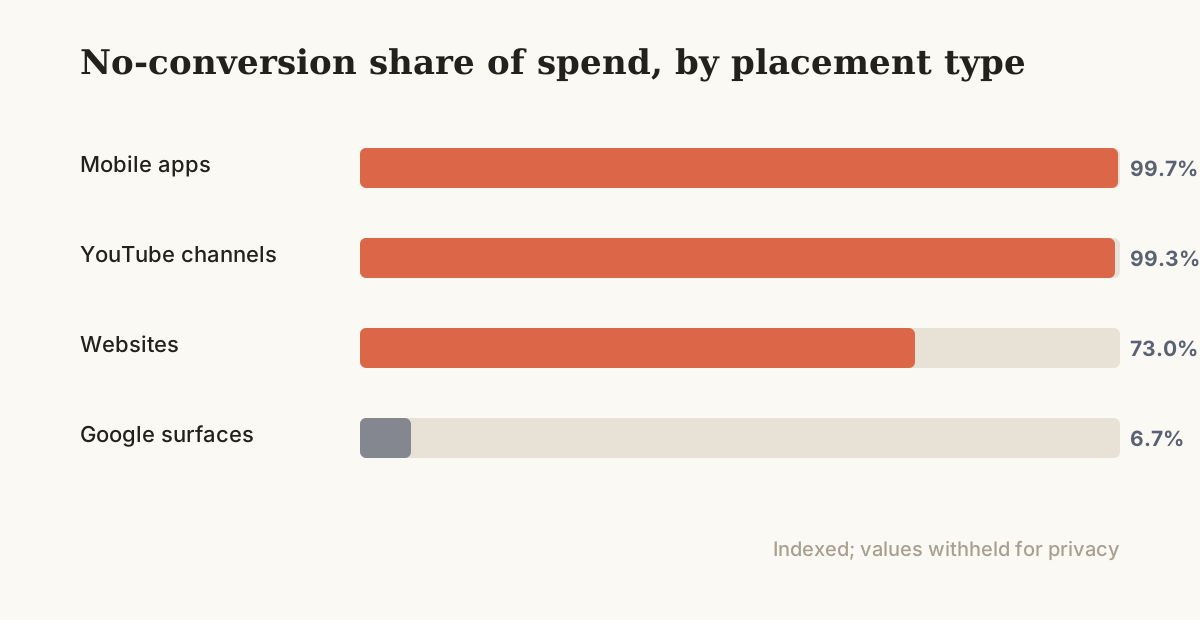
The tail is not random, it clusters. Mobile-app placements are the worst we see: across our accounts, 99.7% of app-placement spend produced no conversion. Most of it is accidental taps in free games and utility apps, the kind of click that never wanted your product. YouTube channel placements sit close behind at 99.3% on a last-click basis, though those need more care, because some of them assist a conversion that closes elsewhere.
The contrast is what proves the point. Spend on Google's own surfaces converted fine: only 6.7% of it sat on no-conversion placements. So the fix is not to fear Display or refuse Performance Max. It is to read the report and cut the part that only costs.
Read the receipt, then cut what only spends.
We pull the placement report and sort it by spend. Display gives full placement detail; Performance Max gives a thinner placement list, but enough to act on. Then we sort every placement into three buckets. The ones that convert, which we keep and bid into. The ones that spend with no conversion but plausibly assist, which we watch and do not cut blind. And the ones that spend with no conversion and no plausible role, which we cut.
The cut is mostly two moves. We exclude mobile-app inventory for an ecommerce account, because it almost never pays, and we build a negative-placement list of the no-conversion, no-assist websites and channels. On Performance Max, where the controls are thinner than Display, we use account-level placement exclusions, content-suitability settings, and the placement list to steer. This is the same hygiene behind our Google Ads management: the budget should land where the conversions are.
- Pull and sort the placement report
- Exclude mobile-app inventory
- Negative-list the proven-junk placements
What moved the number.
Three moves do the work, and the order is from clearest to most careful. The clearest cut is mobile apps, where the spend is almost pure waste. The most careful is the YouTube and website tail, where we keep what assists. The figure shows where the no-conversion spend concentrates.
a Cut mobile-app inventory
Mobile-app placements are the fastest win in the network. Across our accounts 99.7% of app-placement spend produced no conversion, because most of it is a stray tap inside a free game, not a person shopping. For an ecommerce account there is almost no reason to keep it on.
On Display we exclude the mobile-app category outright. On Performance Max, where the lever is blunter, we use the account-level placement exclusions and the content settings to push the same budget away from app inventory. It is the single cleanest cut on most accounts, and it costs nothing to make.
b Negative-list the junk, keep the assist
The website and YouTube tail needs a steadier hand. A channel can show 99.3% no last-click conversion and still be earning its place by assisting a sale that closes on Search or direct later. So we do not cut on last-click alone. We read assisted conversions and view-through alongside it, and we cut only the placements that show no role at all.
What is left after that is genuine waste: made-for-advertising sites, parked domains, content with nothing to do with the product. Those go onto a negative-placement list that we maintain rather than set once, because the inventory churns and new junk shows up every month.
The goal is a shorter, cleaner placement list, not the smallest one. Cut the waste, keep the assist.
c Move the budget into what converts
Cutting placements is only half the move. The point of removing the waste is that the budget it was eating goes back to the head of the list, the placements and audiences that actually convert. An account that was spending most of its Display and PMax budget on apps and dead sites has a lot of room to recover once that spend is redirected.
On Performance Max the redirection is indirect: you cannot bid a placement up, but a cleaner exclusion set and better signals push the system toward the inventory that works. On Display it is direct, through placement and audience bids. Either way the same budget starts buying conversions instead of taps.
Most of the placement spend was buying nothing.
Read across the accounts we run, the headline is blunt: 73% of placement spend sat on placements that never converted, and on the worst inventory it ran to 95%. The breakdown by type is where the action is. Mobile apps and YouTube channels carry almost all of the waste, while Google's own surfaces convert.
None of this needs more budget. It needs the placement report read and the junk cut, so the spend that was landing on free-game taps lands on people who shop instead.
- Every number here came from reading the placement report and cutting what only spends. None of it came from a bigger budget.
When the placement audit pays, and when to skip it.
This work pays when an account runs real money through Display, Performance Max, or video, because that is where placements exist to prune. The more of your budget sits in those campaigns, the more there is to recover. A Search-only account has no placements to cut, and the lever does not apply.
It also needs enough conversion history to judge a placement fairly. On a brand-new account with thin data, a placement showing no conversion may not have had its chance yet, so we wait for volume before cutting. On an established account the opposite is true: the waste has been compounding for months and the audit is overdue.
The traps in a placement cleanup.
Cutting on last-click alone is the big one. A placement with no last-click conversion can still be doing real work upstream, and if you negative it on the headline number you lose the assist with the waste. So we always read assisted and view-through conversions before we cut a website or a channel, and we treat mobile apps as the only safe blind cut.
Over-exclusion is the next trap. Strip too much inventory and you starve the campaign of the reach it needs to find buyers, which on Performance Max can stall the whole thing. We cut the proven waste and stop, rather than chasing a perfectly clean list that leaves nothing to spend on.
Then there is Performance Max itself, where Google gives you a placement report but only blunt controls to act on it. You cannot exclude a single placement the way you can on Display, so the work shifts to account-level exclusions, content settings, and the signals you feed the campaign. It is slower, and it is worth doing anyway.
Last is churn. A placement list cleaned once drifts back, because new apps and sites enter the inventory every month. We re-pull the report on a schedule instead of treating the cleanup as a one-time job.
The placement audit, step by step.
A placement audit runs the same way each month, and the order keeps it safe. First, pull the full placement report across Display, Performance Max, and video, sorted by spend, with conversions, assisted conversions, and view-through alongside it. The spend column tells you where the money is; the conversion columns tell you whether it earned its place.
Second, make the safe cut. Exclude mobile-app inventory for the ecommerce account, because it almost never converts and rarely assists. This is the move that recovers the most with the least risk, so it goes first.
Third, work the tail with judgement. Go down the no-conversion websites and channels by spend, check each for an assist or view-through role, and negative-list only the ones with no role at all. The ones that assist stay, even at zero last-click.
Fourth, redirect and recheck. With the waste gone, the freed budget flows back to the converting head of the list, and we re-pull the report next month to catch the new junk before it compounds. Done in this order, the same budget stops buying taps and starts buying customers.
What to remember.
Display and Performance Max place your ads for you, and most of where they place them never converts. Across the accounts we run, 73% of placement spend sat on placements that earned nothing, and on the worst inventory it ran to 95%.
The fix is not to switch the networks off, it is to read the report. Cut mobile apps outright, negative-list the dead sites and channels while keeping what assists, and redirect the freed budget to what converts. It is account hygiene, not a bigger budget, and it is overdue on most accounts we inherit.
- Mobile-app inventory excluded, where 99.7% of spend produced no conversion
- No-conversion websites and channels negative-listed, while assisting placements were kept
- Placement budget redirected from dead inventory back to the converting head of the list
- A monthly placement audit kept the list clean as new junk entered the network